Contents(5)
The Editor says: The Olympus E-M1 Mark II has become the go-to weapon of choice for many underwater photography masters in recent years. Its outstanding performance across the board has firmly established it as the flagship of the M4/3 system. But buying the camera is one thing — being confronted by a bewildering array of settings is another. Too many shooters end up relying on auto mode for every shot, or find themselves fumbling with parameters in front of a fascinating sea creature and missing the moment entirely. We are especially grateful to JIM & LYNN PHOTOGRAPHY, fresh from winning the Sony World Photography Awards Taiwan National Award, for sharing their complete Olympus E-M1 Mark II underwater settings with absolutely nothing held back!
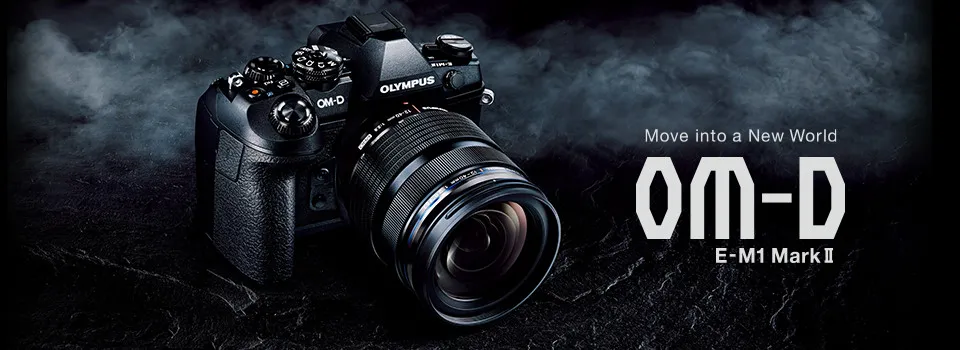
Summer is just around the corner — are you ready to dive? For those who have chosen the Olympus E-M1 Mark II as part of their underwater camera setup, we are sharing our full camera settings here, in the hope that they will help you get up to speed faster.
1. Quick Camera Comparison Chart
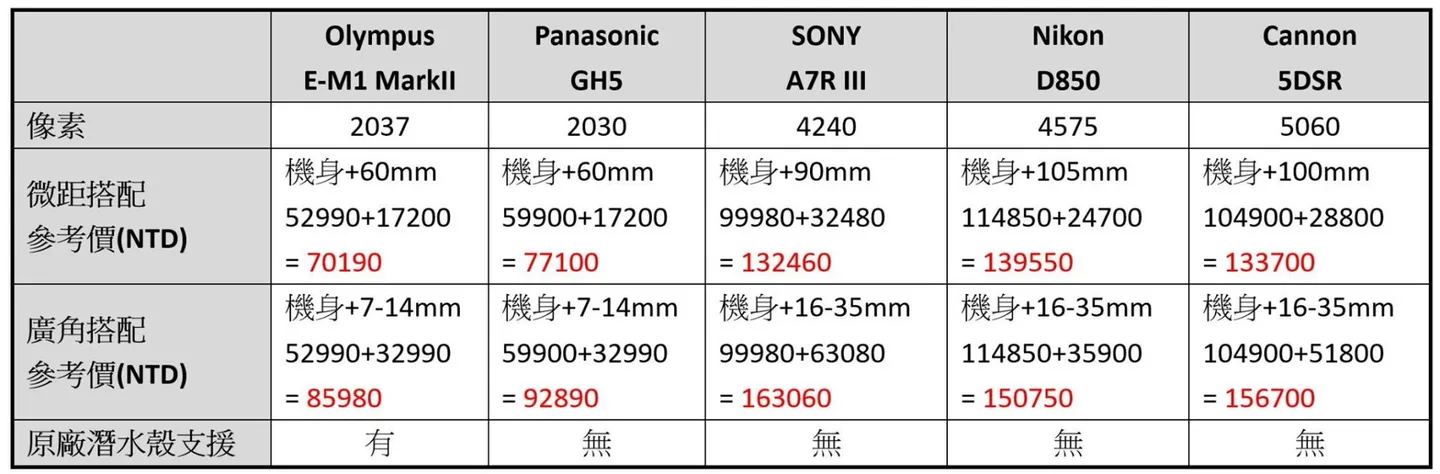
Product compatibility comparison chart


2. Olympus E-M1 Mark II Quick Settings
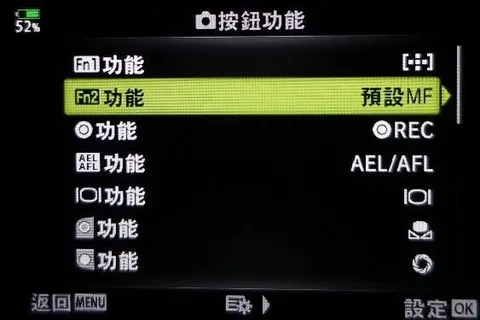
(1) Button Functions
Path: Press OK / Quick Menu / Button Function / OK / Enter Settings
Alternatively: MENU / Custom Menu / B / Button Function / Enter Settings
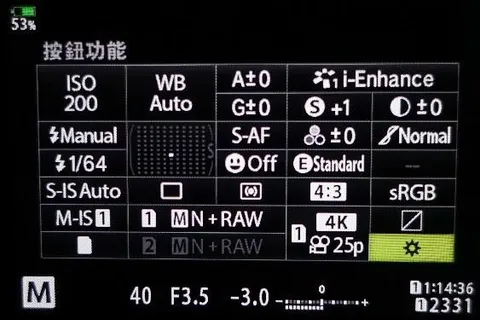
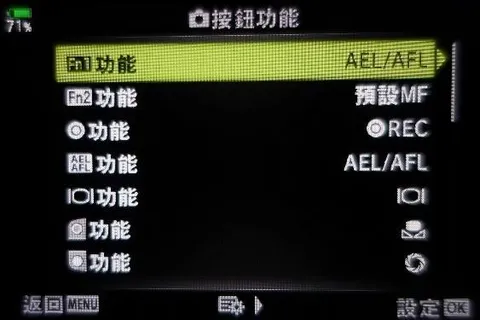
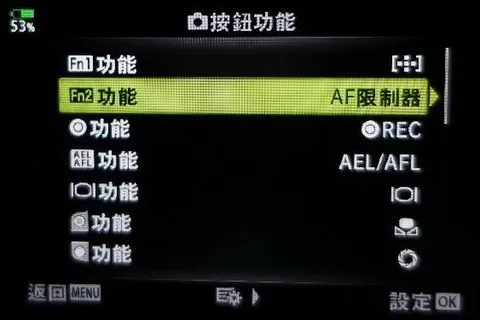
Notes:
Fn1 is assigned to AEL/AFL — pressing the button activates AEL/AFL. On the Olympus housing, the Fn1 button sits in a position that is easy to reach with the thumb, making AEL/AFL a natural fit for quick underwater use.
Fn2 is set according to personal macro shooting preference — either AF Limiter or MF Default Position. Both will be explained in detail below.
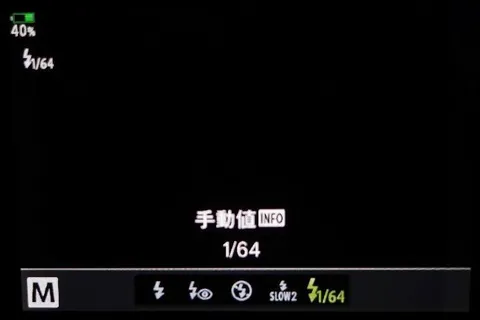
The directional controller is set to Direct Function. The right arrow key is assigned to the flash output setting, which can be set to 1/64 output to extend battery life.
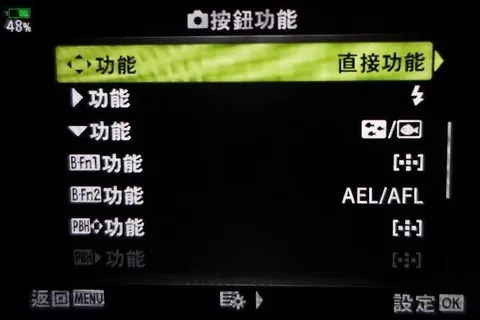
The down arrow key can be assigned to Exposure Compensation, though note that this only works in P/A/S modes — it has no function in M mode.
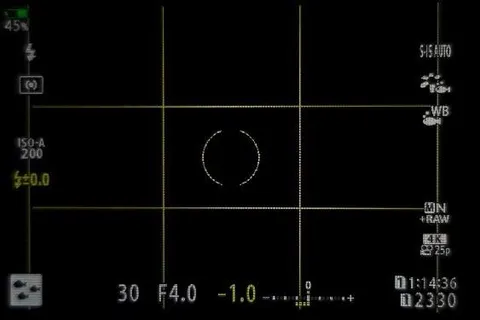
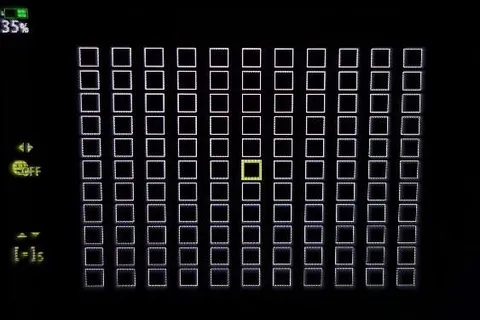
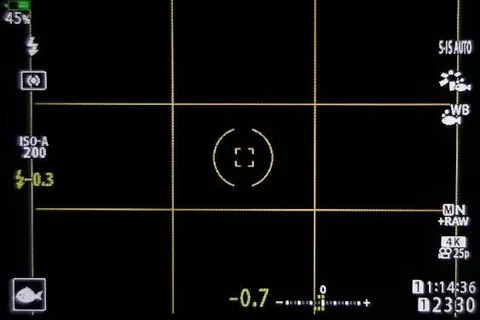
The down arrow key can alternatively be assigned to Underwater Mode — an Olympus-designed preset that helps users capture satisfying shots more quickly. Pressing the down arrow key and selecting Underwater Wide-Angle Mode (3 fish icon) gives you a default of 121 AF points covering the full area. To switch, press the left arrow key, then use the up/down arrows to select the desired AF range.
In Underwater Wide-Angle Mode, flash output defaults to ±0.0 and EV is set to -1.0. You cannot adjust the aperture (maximum f/4.0) or shutter speed (slowest 1/30 sec), but you can adjust the EV value. In Underwater Macro Mode (1 fish icon), the default is single-point AF. To switch, press the left arrow key, then use the up/down arrows to select the AF range. Flash output defaults to -0.3, EV is set to -0.7. You cannot adjust the aperture (maximum f/8.0) or shutter speed (slowest 1/125 sec), but you can adjust the EV value.
(2) RC Mode
Path: MENU / Shooting Menu 2 / RC Mode / Off or On / OK
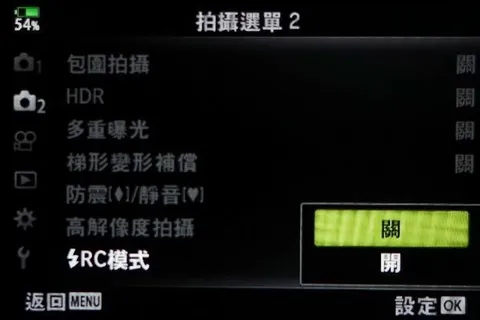
Notes: Set to On when using an Olympus UFL-2 or UFL-3 strobe. Set to Off when using strobes from other brands.
(3) AEL/AFL Lock
Path: MENU / Custom Menu / A1 / AEL/AFL Lock
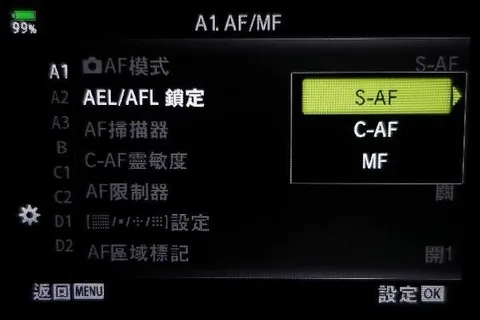
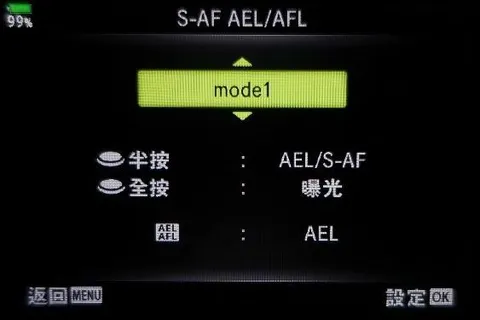
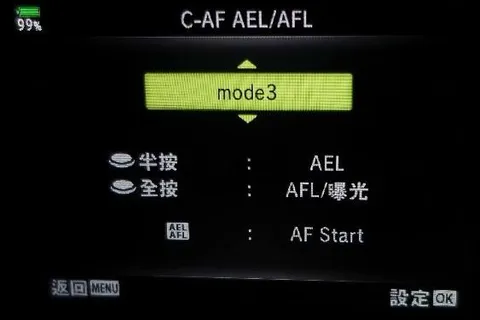
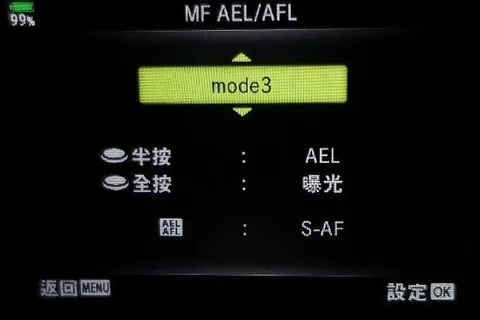
Notes: Our settings are S1/C3/M3, for the following reasons:
S-AF (Single AF) uses Mode 1 — this is the camera's default focus mode. The camera focuses when the shutter button is half-pressed and fires when fully pressed. I use S-AF when the subject requires me to re-focus each time I compose a shot.
C-AF (Continuous AF) uses Mode 3 — this separates the shutter button from continuous focusing, so that continuous AF is active only while the AEL/AFL button is held down, and the shutter button is pressed only when you want to capture the shot. C-AF is the primary mode for video, as it allows the focus to be adjusted during recording.
MF (Manual Focus) uses Mode 3 — same concept as C-AF: the shutter button is decoupled from autofocus, so you can lock focus and fire multiple shots without needing to re-focus. In this mode you can focus manually or use AEL/AFL for autofocus. This is the ideal setup for general macro shooting.
(4) AF Limiter
Path: MENU / Custom Menu / A1 / AF Limiter / On / Distance Setting / Setting 1
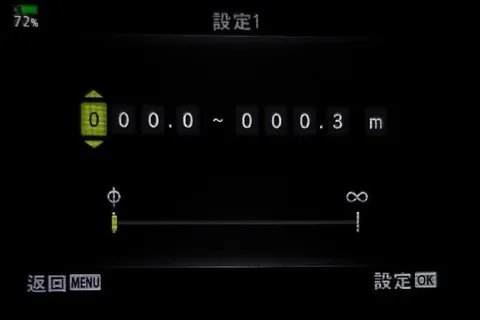
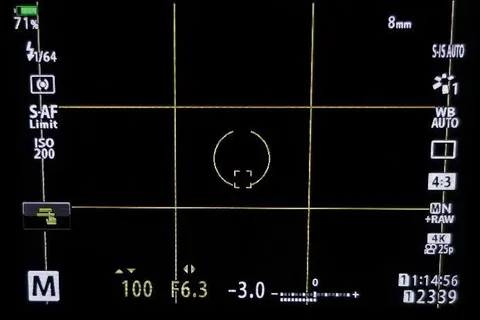
Notes: This restricts autofocus to a specified range — for example, 0–30 cm. It is extremely useful for macro and blackwater photography. Up to 3 presets can be saved. When the background contains reef or floating particles at a very different distance from your macro subject, the camera may hunt across the entire focal range and cause you to miss the shot. With the AF Limiter enabled, autofocus is confined to the specified range. You can also assign this function to an Fn button so you can toggle it on and off freely. When the AF Limiter is active, the word "Limit" appears beneath "S-AF" on the left side of the camera screen.
(5) AF Target Custom Settings
Path: MENU / Custom Menu / A2 / (AF Target) Custom Settings / Setting 1
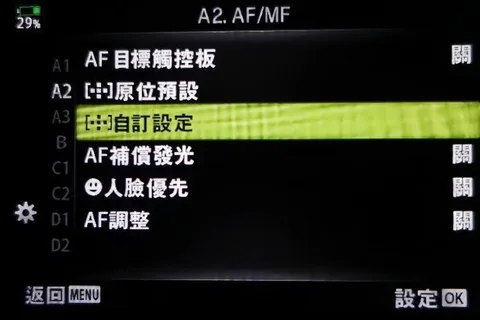
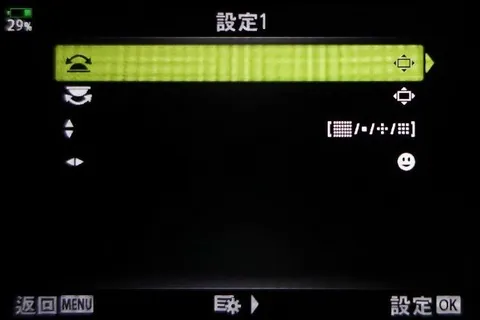
Notes: Use the front and rear dials to "move the AF target position." The up/down directional controller is set to AF area selection, and the left/right directional controller is set to Face Detection. The up/down directional controller can also be set to "move the AF target position," in which case the left/right controller will automatically follow suit.
(6) MF Default Position
Path: MENU / Custom Menu / A3 / MF Default Position / 0m / OK
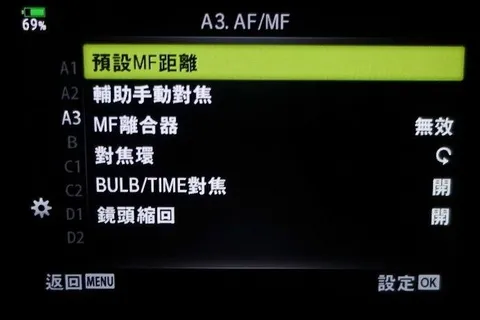
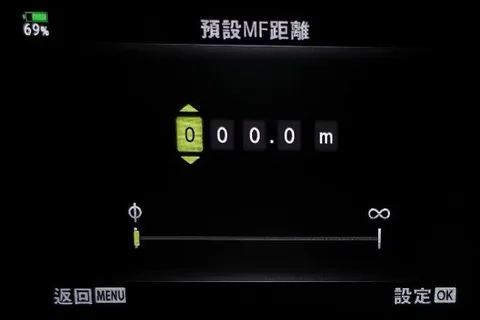
Notes: When shooting subjects that require maximum magnification, this sets the manual focus point to the minimum focusing distance (maximum magnification) as a starting position. You can also assign this function to an Fn button so you can toggle it freely. Combined with Fn1's AEL/AFL for autofocus, this becomes the ideal setup for general macro shooting.
(7) MF Clutch — Set to Disable
Path: MENU / Custom Menu / A3 / MF Clutch / Disable / OK
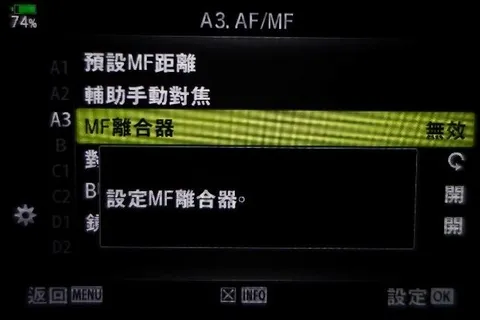
Notes: When the MF Clutch is disabled, the camera can still autofocus even if the lens clutch has accidentally been moved to the MF position. When shooting underwater, the camera is sealed inside the housing and you cannot freely switch the lens clutch as you would on land — so it is best to disable this function. If you accidentally leave the lens in manual focus mode, this setting disables the clutch, allowing the camera to restore normal autofocus even underwater, so you don't waste an entire scuba tank.
(8) Dial Function
Path: MENU / Custom Menu / B / Dial Function / Enter Settings / M
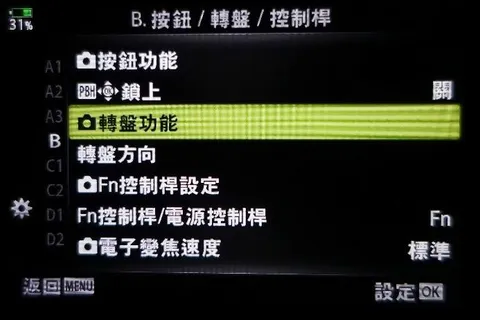
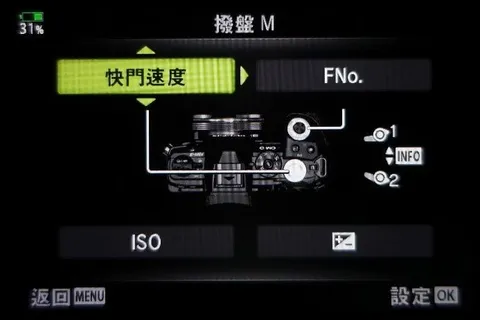
Notes: The rear (thumb-side) dial controls shutter speed; the front (index-finger-side) dial controls aperture.
(9) Fn Lever Settings
Path: MENU / Custom Menu / B / Fn Lever Settings / Fn Lever Function / Mode 3 / OK
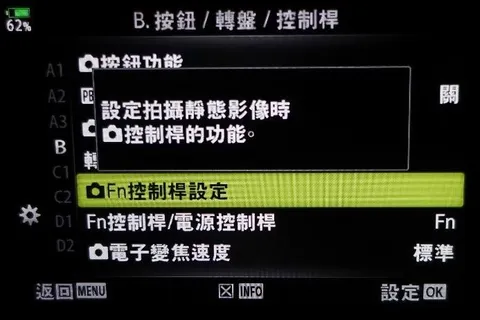
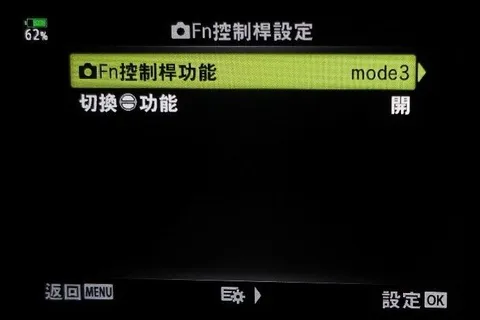
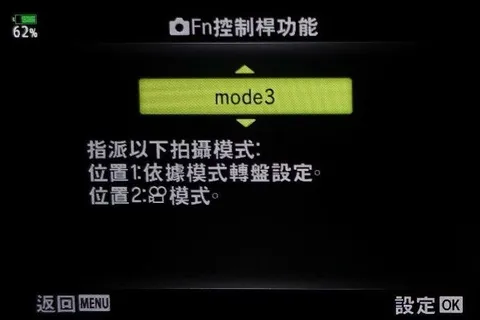
Notes: If you shoot underwater video, setting Mode 3 lets you switch to Position 2 before starting recording. In the video standby screen, you can use the directional keys to adjust EV, white balance, ISO, and focus mode before hitting record.
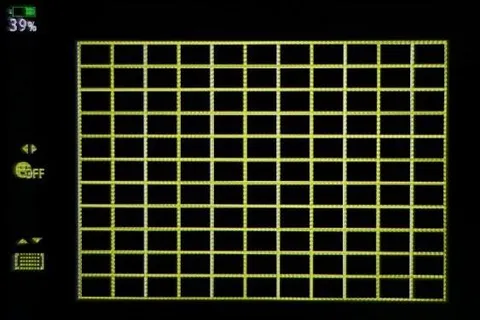
(10) Grid Settings
Path: MENU / Custom Menu / D3 / Grid Settings / Display Color / Preset 1
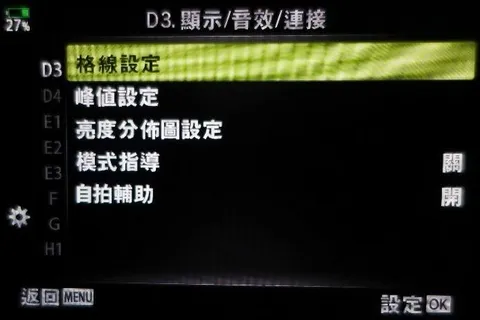
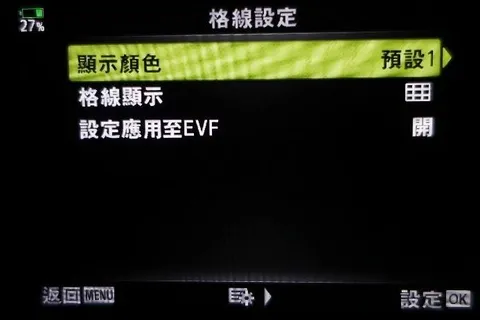
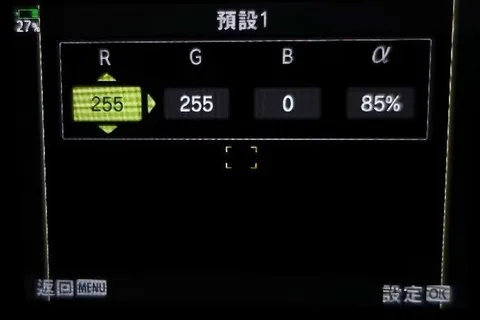
Notes: For the grid display color, setting it to yellow underwater makes it much easier to see. The recommended values are R:255, G:255, B:0, α:85%.
(11) EVF Settings
Path: MENU / Custom Menu / I / EVF Auto Switch / Off
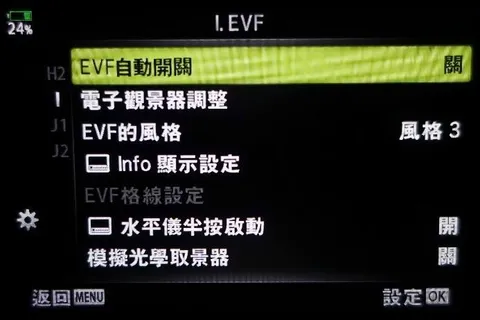
Notes: EVF Auto Switch — Off. This disables the automatic switching between the camera's LCD screen and the EVF. This is critically important for underwater use: the housing sits close to the EVF sensor, and if EVF Auto Switch is left on, the camera may detect the housing as an object near the viewfinder, activating the EVF and turning off the LCD — leaving you unable to frame shots on the screen underwater.
(12) Power Save Settings
Path: MENU / Custom Menu / J2
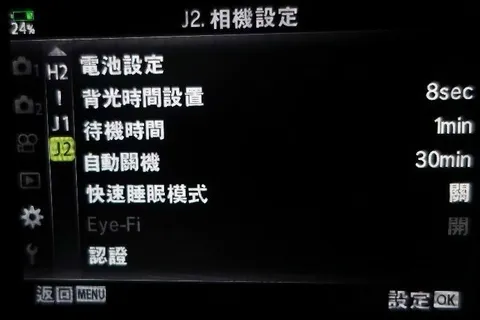
Notes: Backlight timer set to 8 sec, standby time 1 min, auto power off 30 min. These are the power-saving settings I find best suited to underwater photography.
(13) Playback Settings After Shooting
Path: MENU / Setup Menu / Record View
Notes: This controls how long a captured image is displayed on screen after shooting. The default is 0.5 sec. My personal preference is 2 sec.
3. Detailed Settings
Once you have completed all the settings above, you are ready to get in the water. If you would rather not dive any deeper into camera menus, feel free to skip the rest. What follows is a more detailed breakdown.
MENU
(1) Shooting Menu 1
Picture Mode — Vivid produces more saturated images with enhanced reds and oranges. This only affects JPEGs; RAW files are unaffected.
Image Quality — We recommend shooting RAW. We typically set this to SN+RAW or RAW only.
Image Aspect Ratio — Use the standard 4:3 ratio.
Digital Tele-converter — Off.
(2) Shooting Menu 2
Bracketing — Off.
HDR — Off.
Multiple Exposure — Off.
These features can be used for creative effects and are considered advanced techniques that we will cover separately. For general underwater photography, all three can be left off.
Keystone Compensation — Off.
RC Mode — Off.
Set to On when using an Olympus UFL-2 or UFL-3 strobe. Set to Off for strobes from other brands.
Custom Menu
(3) A1. AF/MF
AF Mode — Choose S-AF, C-AF, or MF depending on whether you are shooting wide-angle or macro and what the situation calls for.
AEL/AFL Lock — This function is ideal for underwater shooting because it decouples focus lock from the shutter button. Once the focus point is locked, you can fire multiple shots without needing to re-focus. S1/C3/M3.
S-AF (Single AF) Mode 1 — The camera's default focus behavior. Focus is acquired with a half-press of the shutter button; the shot is captured on full press. Use S-AF when each shot requires a fresh focus.
C-AF (Continuous AF) Mode 3 — Separates the shutter button from continuous autofocus. Hold the AEL/AFL button to maintain continuous focus; press the shutter button only when you want to capture the image. C-AF is the preferred mode for video, as it allows focus to be adjusted during recording.
MF (Manual Focus) Mode 3 — Same logic as C-AF: the shutter button is decoupled from AF, so you can lock focus and shoot multiple frames without re-focusing. You can focus manually or use AEL/AFL for autofocus. This is the ideal setup for general macro shooting.
AEL stands for Auto Exposure Lock. In Aperture-priority (A) mode, activating AEL and then recomposing will prevent the camera from recalculating the shutter speed. Similarly, in Shutter-priority (S) mode, AEL prevents the camera from recalculating the aperture when you reframe. Try it in both very dark and very bright scenes to fully appreciate the difference. AFL stands for Auto Focus Lock.
(4) A2. AF/MF
AF Target Touchpad — Off.
Home Position Reset — Restoring power after a shutdown returns the camera to a fixed AF area. The default is All AF points; you can change this to a single AF point at a specific position to better suit your underwater shooting needs.
AF Target Custom Settings — Setting 1: use the front and rear dials to move the AF target. The up/down directional controller is set to AF area selection; the left/right controller is set to Face Detection. The up/down controller can also be reassigned to move the AF target, in which case the left/right controller will automatically do the same. A second custom set can also be configured.
AF Illuminator — Off. This is the red AF-assist lamp on the camera body. Turn it off to save battery power.
Face Priority — Off. When the camera detects a face it focuses on it automatically, but underwater this can produce false detections and cannot reliably identify a diver's face behind a mask. This feature is not needed underwater.
AF Adjust — Off. This fine-tunes the AF point for specific lenses and is an advanced function; the default is Off.
(5) A3. AF/MF
MF Default Position — When shooting subjects requiring maximum magnification, this presets the manual focus point to the minimum focusing distance (maximum magnification). Assigning this function to the Fn2 button lets you toggle it freely, and pairing it with Fn1's AEL/AFL for autofocus creates the ideal setup for general macro shooting.
MF Assist — When manual focus is used, the camera screen magnifies the image and applies focus peaking. Requires a prime lens with a focus ring.
MF Clutch — Disable. With the MF Clutch disabled, the camera can still autofocus even if the lens clutch has accidentally been left in the MF position.
When shooting underwater, the camera is sealed inside the housing and you cannot freely switch the lens clutch as you would on land, so this function is best disabled. If you accidentally leave the lens in manual focus mode, this setting disables the clutch, allowing the camera to restore normal autofocus even underwater, so you don't waste an entire scuba tank.
Focus Ring — Sets the direction of focus ring rotation.
BULB/TIME Focus — Not needed underwater; leave at the default (On).
Lens Retract — Off. Not applicable underwater. The camera resets the lens position after power-off. Turn this off if you want the lens to remain in its last position.
(6) B. Button / Dial / Lever
Button Function — Fn1 is assigned to AEL/AFL. On the Olympus housing, the Fn1 button sits in a position that is easy to reach with the thumb, making AEL/AFL a natural fit for quick underwater response. Fn2 is set according to personal macro shooting preference — either AF Limiter or MF Default Position; both are explained below.
The directional controller is set to Direct Function. The right arrow key is assigned to the flash output setting, which can be set to 1/64 output to extend battery life.
The down arrow key can be assigned to Exposure Compensation, though this only functions in P/A/S modes and has no effect in M mode.
The down arrow key can alternatively be assigned to Underwater Mode — an Olympus-designed preset that helps users get satisfying results more quickly. Press the down arrow key and select Underwater Wide-Angle Mode (3 fish icon) to get a default of 121 AF points covering the full area. To switch, press the left arrow key, then use the up/down arrows to select the desired AF range. In Underwater Wide-Angle Mode, flash output defaults to ±0.0 and EV is set to -1.0; aperture (maximum f/4.0) and shutter speed (slowest 1/30 sec) cannot be adjusted, but the EV value can. In Underwater Macro Mode (1 fish icon), the default is single-point AF. To switch, press the left arrow key, then use the up/down arrows to select the AF range. Flash output defaults to -0.3, EV is set to -0.7; aperture (maximum f/8.0) and shutter speed (slowest 1/125 sec) cannot be adjusted, but the EV value can.
Dial Function — In M mode, for example, the rear (thumb-side) dial controls shutter speed and the front (index-finger-side) dial controls aperture.
Fn Lever Settings — If you shoot underwater video, setting Mode 3 lets you switch to Position 2 before starting recording. In the video standby screen, you can use the directional keys to adjust EV, white balance, ISO, and focus mode before hitting record.
(7) E3. Exposure / ISO / BULB
Metering — The default is ESP metering. For more precise metering of your subject underwater, you may want to switch to Center-weighted or Spot metering.
AEL Metering Mode — Default is Auto.
Spot Metering — Default is All. Options include Spot, Highlight Spot, and Shadow Spot metering.
(8) F. Flash Custom Settings
Flash Sync Speed — Use the default of 1/250 sec, which is the fastest flash sync speed available on the Olympus E-M1 Mark II.
Slow Limit — Use the default of 1/60 sec; this can be lowered further as needed.
Flash + Exposure Compensation — Off.
Flash + White Balance — Default is WB AUTO.
(9) EVF
EVF Auto Switch — Off. This disables the automatic switching between the LCD screen and the EVF. This is critically important for underwater use: the housing sits close to the EVF sensor, and if EVF Auto Switch is left on, the camera may interpret the proximity of the housing as an object near the viewfinder, activating the EVF and turning off the LCD — leaving you unable to frame shots on the screen underwater.
(10) J2. Camera Settings
Backlight Timer — 8 sec.
Standby — 1 min.
Auto Power Off — 30 min.
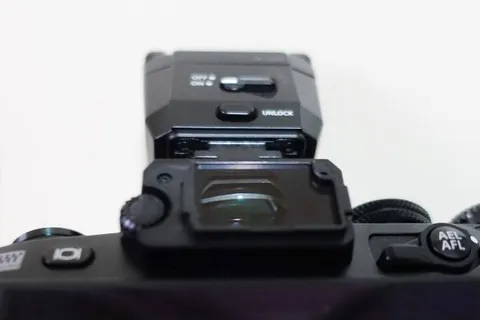
(11) Before fitting the camera in the housing, remove the viewfinder eyecup and turn the flash ON.
Coming up next — the main event: Olympus E-M1 Mark II Underwater Settings Guide Part II, covering three sections:
4. Using the Underwater Housing
5. Olympus E-M1 Mark II Macro Shooting
6. Olympus E-M1 Mark II Wide-Angle Shooting
The highlights are being compiled — stay tuned……
Related Links: